
How Long Does Exhibition Stall Design Take? Measure the Whole Workflow
Exhibition stall design time depends on the brief, complexity, available assets, review process and required deliverables. The important thing is to separate the time needed to create a first visual from the time required to reach an approved, usable design. Track active design work, rendering, feedback waiting and rework before comparing software or promising a deadline.
A first image and a usable handoff are different milestones. Any time estimate should clearly state which one it covers.
At a Glance
Separate active effort from total project time. Before measuring how long exhibition stall design takes, define whether the deadline refers to an initial concept, an approved design or a technical handoff. Then track missing inputs, asset preparation, design work, output generation, client review and corrections.
This gives you a much more useful comparison than putting one supplier's fastest render against another team's complete design process.
What Does “Design Complete” Mean?
Before estimating a timeline, define where the design process is supposed to stop. A concept proposal may include a few views and an overall visual direction. A design approval may mean that the layout, fascia, branding and major visual decisions have been agreed. A technical handoff can go further and include measurements, materials, production information and an agreed model format.
If two designers or software platforms quote different completion times, first check whether they are talking about the same deliverable. One may be referring to the first visual. Another may include revisions, approvals and production coordination. Comparing those numbers without comparing the scope can give a misleading picture of speed.
The type of software also matters. Autodesk positions 3ds Max as a platform for modelling, rendering and animation, while a booth-specific builder can focus on a narrower exhibition design workflow. A useful timing comparison therefore needs to state exactly which tasks are included.
Source: Autodesk 3ds Max Overview
Which Stages Should You Record?
Use a project log that separates briefing, asset preparation, layout, detailing, presentation, review, rework and handoff. Record both active effort and waiting time because they answer different questions.
Active effort shows where the design team is spending its working hours. Elapsed time shows how long the project takes from the agreed starting point to the accepted result. Do not automatically add every individual stage together to calculate elapsed time because some activities may overlap.
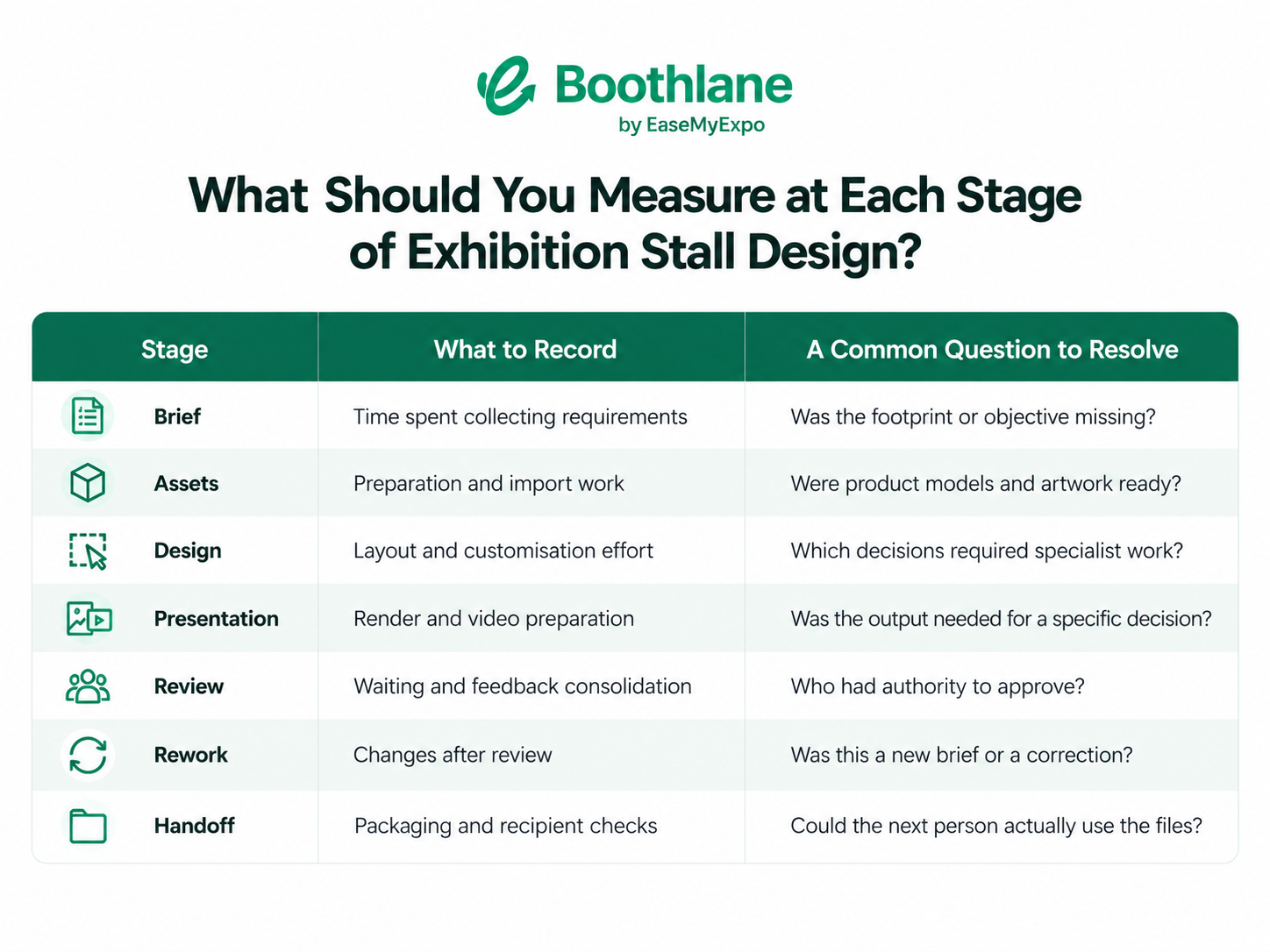
This is a proposed measurement framework, not a report of industry averages.
Why Does the Brief Affect the Timeline?
A missing product dimension can force the layout to be revisited. A late logo replacement can change the fascia composition. An unclear objective can result in a visually strong stall that still solves the wrong problem.
That is why important requirements should be collected before detailed design work begins. Where information is still unavailable, record the assumption and identify who is responsible for resolving it. This turns an invisible risk into a visible project decision.
A clear brief cannot eliminate every change, but it makes it easier to separate a genuine new requirement from an avoidable misunderstanding.
How Can Reusable Assets Help?
An organised object library can reduce repeated preparation for elements that appear across multiple projects. But the useful measure is not simply how many files are available. A useful 3D asset should have reliable dimensions, appearance, source information and any necessary usage restrictions.
Boothlane supports a catalogue-based workflow as well as custom 3D model import. Before relying on an imported model across multiple projects, test a representative object first. Boothlane's launch coverage also describes support for OBJ and FBX import and export, allowing teams to bring existing assets into the design workflow and move completed models into compatible applications.
However, the actual time saved by your team should be measured rather than assumed.
Source: EVENTFAQS – Boothlane product launch coverage
A file that opens at the wrong scale or arrives with missing materials can create more work than a simpler object that has been prepared correctly. Include cleanup and correction time when evaluating reusable assets.
How Can Client Review Be Made More Efficient?
A large part of exhibition stall design time may sit outside the actual modelling process. Client review can create delays when too many decisions are requested at once or feedback comes from several people separately.
A better approach is to ask for clear decisions at each stage. Approve the layout before requesting final visual preferences. Consolidate feedback before sending changes back to the designer. Make it clear which parts of the design are approved and which decisions remain open.
It also helps to work with named revisions instead of a loose collection of renders or screenshots. When feedback arrives, record whether it changes an already approved requirement or simply corrects how that requirement was implemented.
The goal is not to rush approval. It is to reduce uncertainty around what needs approval and who has the authority to give it.
How Should You Evaluate Software Speed Claims?
If you are comparing exhibition design software, recreate a representative task using the same assets and acceptance criteria. Measure the complete workflow rather than only the fastest successful render.
Separate setup time, active editing, output generation and the work required to make the final result usable. Failures should be recorded too. If an import needs correcting, a model has to be rebuilt or an output needs additional work before it can be presented, that time belongs in the evaluation.
A vendor demonstration can prove that a feature exists. It does not automatically prove that every project will follow the same timeline.
For Boothlane, measure the actual path from an editable stall to an accepted presentation. The platform can help teams design, customise, visualise and present an exhibition stall, but that should not be turned into a claim that the entire design and approval process happens automatically.
How Should You Communicate a Design-Time Estimate?
A useful estimate should explain more than the number of hours or days. State what will be delivered, which assumptions have been made, when reviews are expected and which external inputs the schedule depends on.
Also explain what happens when the brief changes. A significant change in footprint, product requirements or branding can affect previously completed work. That means a responsible time estimate is partly a scope agreement.
After the project is complete, compare the estimate with what actually happened. Look at where time was spent, where the team waited and where rework occurred. That information can make the next project estimate more accurate.
A Timing Example That Separates Effort From Waiting
Consider a hypothetical project. The team spends two hours working on the layout, one hour preparing presentation views, four hours waiting for feedback and one hour making corrections.
The active design effort is four hours. If each stage happens consecutively, the total elapsed time is eight hours. If some activities overlap, elapsed time should instead be calculated using the actual project start and finish.
These figures are illustrative only. They are not Boothlane benchmarks or exhibition-industry averages. The example shows why reducing one rendering step does not automatically remove approval delays.
Before adopting another tool or changing the workflow, identify the stage you are trying to improve and the milestone you intend to measure. That makes the comparison much more useful than relying on a single headline number.
Frequently Asked Questions
Can an Exhibition Booth Be Designed in Minutes?
An early concept or a simple 3D model may be created quickly, but that does not define the timeline for every exhibition project. The answer depends on the brief, complexity, assets, revisions and final deliverables. Always define what “finished” means before comparing design times.
Is Rendering Usually the Biggest Delay?
Sometimes, but not always. Rendering can add time, but missing requirements, unavailable assets, internal approvals and client feedback can also have a major effect on the total project timeline. A project log is the best way to identify where your team is actually losing time.
Should Waiting for Client Feedback Count?
Yes, when measuring total elapsed project time. It should also be recorded separately from active design effort. This makes it easier to understand whether delays are coming from production work or the approval process.
What Is the Best Speed Metric?
Measure the time required to reach an accepted and clearly defined deliverable. Track active effort, waiting time and rework alongside it. A first-render timestamp alone is too narrow to describe the complete exhibition design workflow.
Measure Your Own Exhibition Stall Design Workflow
There is no single number that accurately describes how long every exhibition stall should take to design. The better question is where your own workflow spends its time.
Build a representative stall in Boothlane by EaseMyExpo, track the process from the first layout through revisions and presentation, and use your own project data to identify where the workflow can become faster.